

Unity 2022 LTS was built through years of feedback and user testing. It delivers stable new programming features and coding improvements to keep you productive and focused on creating your most ambitious game. Below, you’ll find updates on DOTS, multiplayer, general coding, and more.
Create with less constraint using DOTS, deliver high-player-count multiplayer with netcode, and process your assets more efficiently with Addressables. Read on to learn more, and check out the release notes for full details.
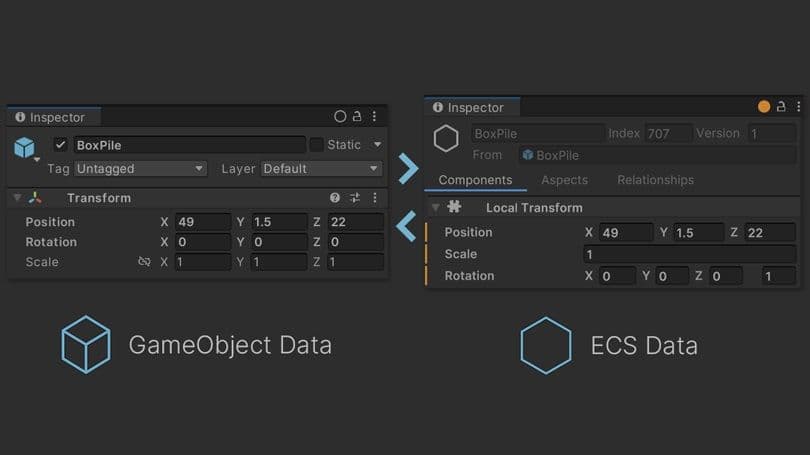
With Entity Component System (ECS) integration, DOTS is now fully supported for production use by experienced creators. ECS for Unity is integrated into the Editor you’re already familiar with. This enables you to leverage your experience building with GameObjects, then utilize the power of Entities-based code when it’s going to give the biggest impact.

Unity’s netcode packages were built to give you the choice between simplicity with casual co-op games, and more complex scenarios such as competitive action multiplayer games.
Built on ECS for Unity, Netcode for Entities will help you create immersive player experiences in large-scale, multiplayer worlds. With our services such as Relay, Lobby, Game Server Hosting, Matchmaker, and Voice and Text Chat, you can build on that solid foundation and deliver a live experience to match.
Check out the Megacity Multiplayer sample to start developing complex multiplayer experiences in Unity.

The Addressables package is built to elevate your content management process. Accelerate iteration cycles with the multi-process AssetBundle build pipeline. Gain valuable insights into your asset bundles using the Addressables Build Report.
Optimize performance and maximize efficiency with the Addressables Profiler Module. Seamlessly integrate with Universal Scene Description (USD), and leverage new interoperability workflows to make asset management more efficient. Learn more about best practices on the blog.

The Memory Profiler 1.0 empowers you to inspect the memory usage of your Unity application and Unity Editor. Capture, inspect, and compare detailed memory snapshots using the dedicated Memory Profiler window.
Gain insights into how your application’s memory is organized, enabling you to optimize and debug effectively.
Developer quality-of-life improvements are key to being more efficient and productive in your day-to-day activities. More of Unity is now taking advantage of Burst, giving you shorter iteration times, improved debugging insights, and a more responsive Inspector.
Async and await constructs now give you more efficient asynchronous programming, and you’ll find it faster to get in and out of Play mode, resulting in more coding and less waiting.

Maximize efficiency with UI Toolkit’s customizable design-time UI. Tailor your Editor setup to your exact needs, achieve better separation of concerns and flexible layouts, and create UI experiences with advanced stylings.
Boost collaboration within your team by customizing the Editor using UI Toolkit. Simplify your development process by generating default inspectors, eliminating the need for custom inspectors when using Property Drawers.
The Vector Drawing API enables you to author splines, graphs, and other visualizations with custom control. Leverage the new TreeView controls to create hierarchical lists more easily.

For 2D creators, we’ve focused on productivity-improving enhancements to foundations, import, animation, and physics. Save time with improvements to help optimize performance, manage large numbers of sprites more easily, enhance memory usage, and achieve faster loading times.
Sprite Atlas now works in the Editor without having to enter Play mode or make a build. PSD Importer brings enhanced layer import management and faster 2D PSD imports for improved productivity.
Delaunay tessellation creates polygon physics shapes with fewer polygons and better results, leveraging the power of the new Physics 2D Profiler module for efficient performance optimization.
Reduce the number of collision layers and object types in the game’s physics with Layer Overrides on 2D Colliders and Rigidbodies.

Increase performance and stability with DirectX 12 graphics API on Windows and Xbox®, and experiment with the latest ray tracing support for Xbox Series X|S. Iterate rapidly and deploy more efficiently on Xbox Series X|S, PlayStation® 5, and Nintendo Switch™ using the latest incremental player build process.
Nintendo Switch is a registered trademark of Nintendo.

Reach a wider audience with expanded platform support for Magic Leap 2, PlayStation®VR2, and Meta Quest Pro. XRI 2.3 provides core XR interactions and supports cross-device development. It builds on existing interactions like grab, UI, and more by adding hand and eye gaze tracking and improves the device simulator for in-Editor testing.
AR Foundation 5.1 includes simulation, so you can run your AR app in Play mode by simulating an AR device rather than rebuilding your app to test changes.

Want even more info on what’s coming this year? Check out the Game Developer Conference Unity Roadmap session here.

Discover the latest artist workflows and tools that enable faster iteration and greater flexibility for an empowered game creation experience.

Listen how Fika Productions, Hugecalf Studios, and Stickylock Studios successfully delivered highly engaging multiplayer experiences using Unity tools and services.

Get Unity 2022 LTS from the Unity Hub – our tool to help you manage Unity Editor installations, create new projects, and access your work in one place. If you’re a new professional user, start by getting a Unity Pro license from your team or the Unity Store.

